

Websites and landing pages
Describe the site. Get the whole page.
A website for a business, or one long page for a launch. Even a one-line request comes back with finished words, real pictures and forms that really send.
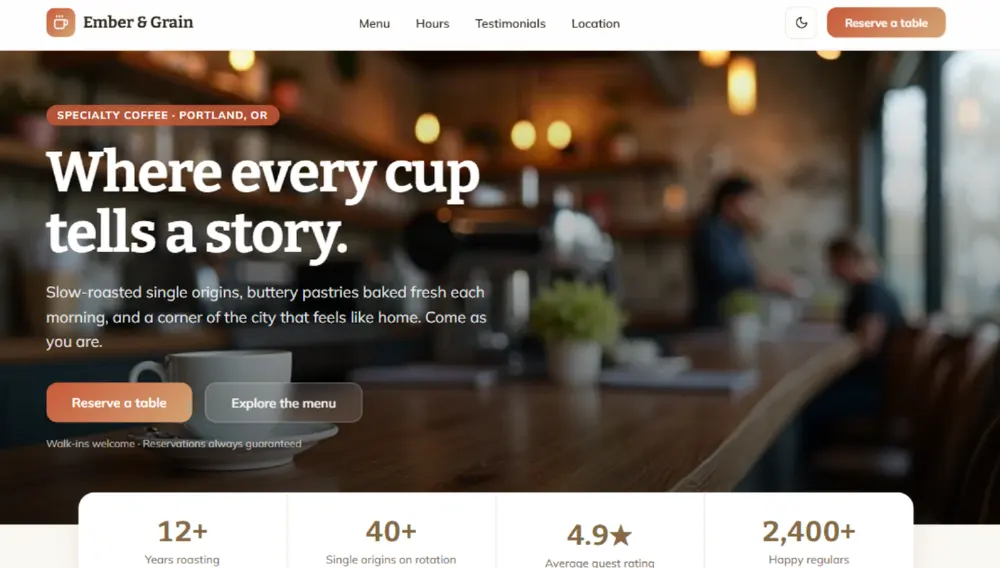
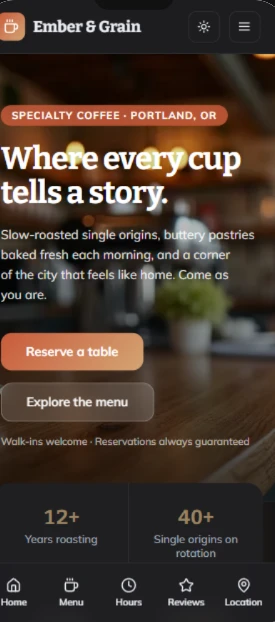
What you get without asking.
Forms that really send
A contact, appointment or quote request reaches you as a message, and you read every one in Manage, under Cloud, then Forms. By default you get an email too, and a visitor who left an address gets a short confirmation that it arrived.
Photographs that fit
Chosen for what the business does: a clinic gets clinics, a bakery gets bread.
A layout for every screen
It is built for phones as well as computers, and measured at phone width after every build.
Pages search engines can find
Each page has its own address, and a published site carries its titles, descriptions, a sitemap and a robots file. A business, a product or an event also gets structured data, which is what search engines read to show it well.
No dead links
Every link goes to a section or a page that exists. A part that is not built yet says Coming soon instead of doing nothing.
Your language
Write the request in the language the site should speak. The letters it sends follow the language of its screens.
A landing page, in order.
Even a one-line request gets the whole page, every section with finished words and real pictures, in this order:
- 1A header that stays on top
- 2The opening
- 3Numbers or names
- 4What it does
- 5How it works
- 6A gallery
- 7Prices
- 8What people say
- 9Questions and answers
- 10A last call to action
- 11A footer
Sign-ups that arrive.
An email, waitlist or contact form sends what the visitor typed to you. You get an email, and you read every one in Manage, under Cloud, then Forms. A form says it was sent only when it was.
Forms in the documentationAsk like this.
Start with what the business is, where, and the one thing a visitor should do.
- A website for a dental clinic in Manchester, with the treatments and their prices, the team, opening hours, and a form to ask for an appointment
- A website for an Italian restaurant, with the menu, photos of the dining room, opening hours, the address on a map and a table reservation form
- A landing page for a cooking workshop in London on 14 March: the chef, the menu, the price, and a form to reserve a place
- A coming soon page for a craft beer bar opening in May, with photos of the place, the address, and a list to hear about opening night
From the request to the web.
- 1
Say what you want
Pick Website, the globe above the box on the dashboard, or simply say "a website for" in your request.
- 2
Change it by pointing
Edit above the preview, then click it. No request needed.
- 3
Put it online
It is free on every plan, takes seconds, and you can do it as often as you like.