

Online stores
A shop, paid straight to you.
An online store shows what you sell, lets people choose, and takes their money. Setherion builds the shop. The money goes through a payment service you connect, straight into your own account.

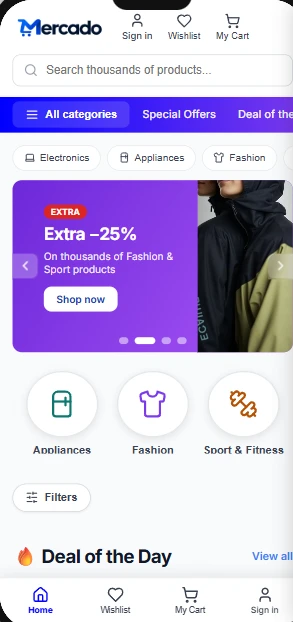
What you get without asking.
Products from the first second
Names, prices, pictures and categories that fit what you sell, until you put in your own.
A design that puts products first
Plenty of white, one warm accent, the photos large.
Accounts for shoppers
With Google or an email and a password. Browsing never needs one.
No pretend checkout
Until payments are set up, every buy button says plainly that payments are not set up yet. A shop never ends in "Order placed" for an order nobody paid for.
Made for phones
A layout for phones, where most people shop.
A store you already run
Connect it once, in Connectors, and choose which apps use it. The shop front shows your real products, and stays up to date as you change them in your store.
See every paid order.
Every paid order appears under Orders, in Manage, then Payments: who paid, how much and when. Refund gives the money back. An order is written when Stripe tells Setherion the payment went through, not when a page says thank you.
Orders in the documentationAsk like this.
Name what you sell and the parts the shop needs. Everything you name gets built.
- An online store for handmade ceramics: product pages with several photos, categories, a cart, and checkout through Stripe
- A shop for a coffee roaster: beans by origin and roast, a page for each one, a cart, and a monthly subscription
- A shop for printed posters, with filters by size and colour, a cart, and a delivery address at checkout
- A new shop front for my Shopify store, with the collections on the home page and a search
Take payments.
- 1
Publish the shop
Stripe looks at the live site before it accepts you, and turns down one that is still under construction.
- 2
Set up Stripe
In the editor, open Manage, then Payments, and connect Stripe. You fill in Stripe's own form and come back: it asks for an ID document and a bank account, and nothing is typed into Setherion.
- 3
Add what you sell
Under What this app sells, press Add: a name, a price, the currency, and One-off, Monthly or Yearly. It goes straight into your Stripe account.
- 4
Ask for the buttons
"Make Add to cart and Checkout pay through Stripe". Setherion knows what you added, and wires each button to the right product.
Your money, your account.
Stripe's own checkout
Buyers pay on Stripe's own checkout page, never on a card form in your shop, and the money goes straight into your Stripe account.
The key stays off the page
The secret key of your Stripe account never sits in the shop. The published shop asks Setherion, which holds it.
Stores you already run
Stock, orders and payments stay where they are today. Nothing moves to Setherion.